The two things that must be true before the Rise B2B API will answer you: your wallet is authorized on your RiseID, and your company is enabled for the API.
Both are set up in the app, and until both are done the API answers with a 403, even when your code and credentials are perfect:
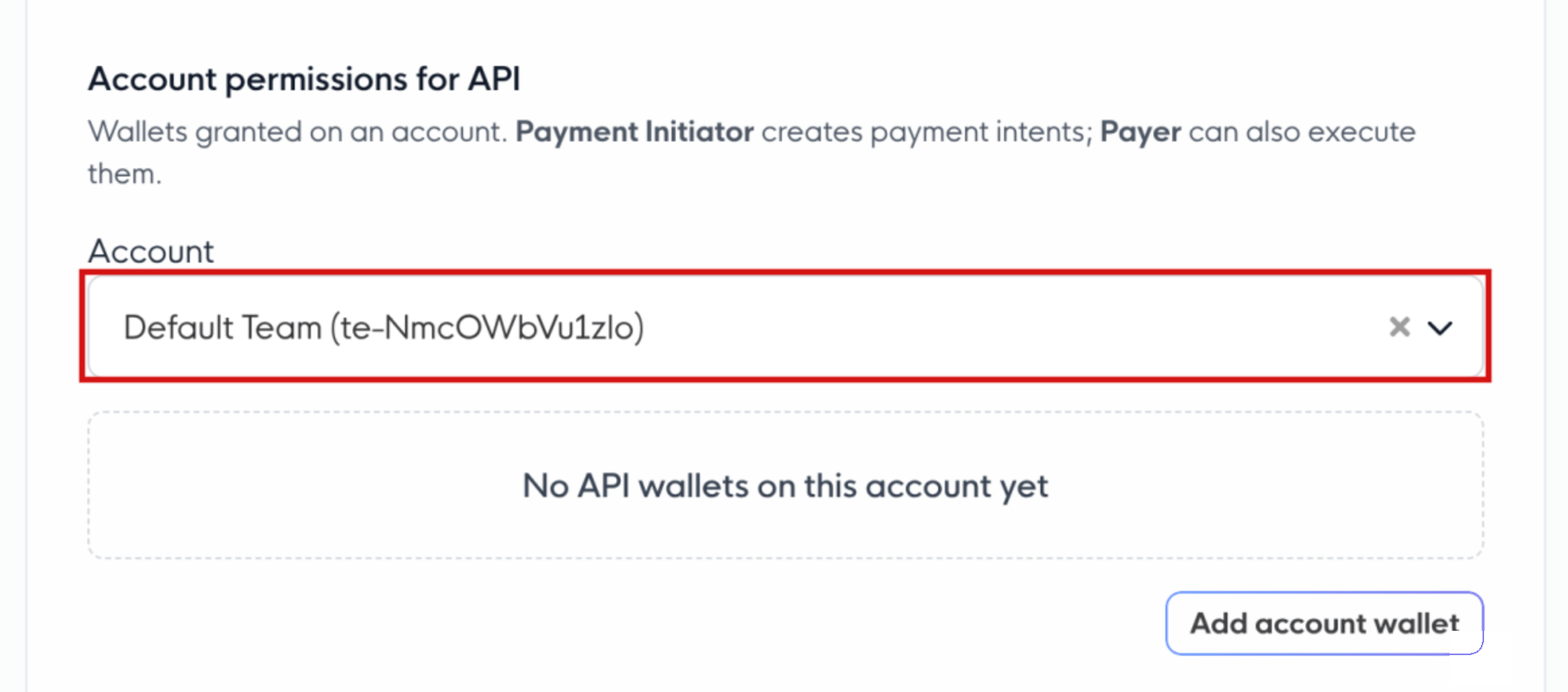
Your API wallet is authorized on your RiseID. You add the wallet’s public address on the API Access page, where it gets the Viewer role. What a Viewer can do on an account depends on the role the same wallet holds there: Payment Initiator to create payment intents, Payer to also pay immediately. Manager invites need an Owner wallet (see What your API session can do).
You have enabled your company for the B2B API. The API is off by default. You switch it on per environment and company, so staging and production are enabled separately.
You do both on the same API Access page, so open that first, then work through the two sections below. If you get stuck, the reference at the end matches each error to its fix.
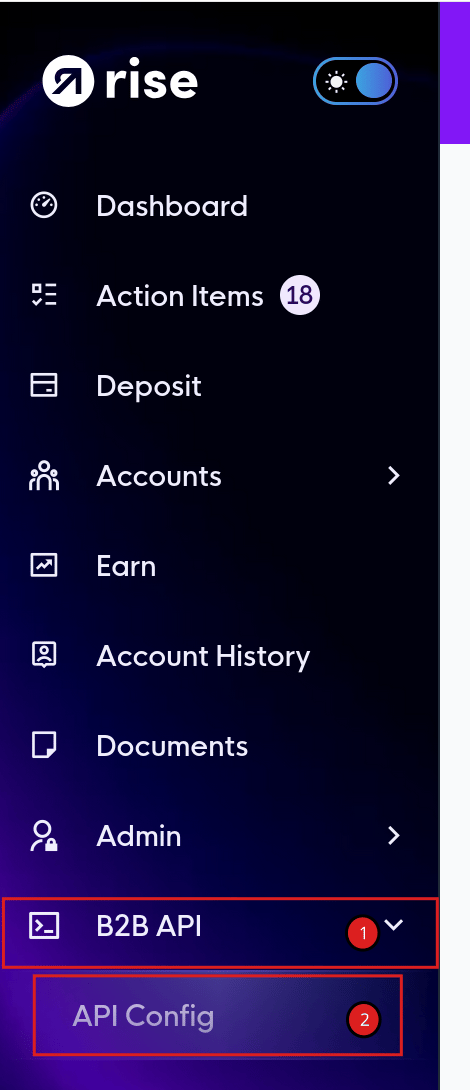
Every step below is managed here, so open it first and come back whenever a step says to. Switch into the workspace for the company you’re integrating, then in the left menu expand API and open Access.
Only the company’s registered owner can manage the API Access page. If you’re integrating on behalf of someone else, the owner has to make these changes.
The wallet you sign in with has to be authorized on your personal RiseID before the login handshake will hand you a token. You add its public address on the API Access page, where it gets the Viewer role. The role applies to every account under your RiseID.
Viewer (added on the API Access page) signs you in. Give the same wallet a role on each account you pay from, under Scoped, low-privilege credentials: Payment Initiator to create payment intents, or Payer to also pay immediately and make instant payments.
Owner (a wallet from Security → Authorized Wallets) can do everything, including inviting managers. Sign in with it only for the calls that need it.
Whichever wallet you sign in with must also sign every request you submit. A payment or manager invite signed by a different wallet gets a 403.
What your integration does
Viewer + Payment Initiator on the account
Viewer + Payer on the account
Owner
Read data and invite payees
✅
✅
✅
Create payment intents (pay_now: false)
✅
✅
✅
Pay immediately (pay_now: true) and instant payments
❌
✅
✅
Invite managers (/v2/invites/manager)
❌
❌
✅
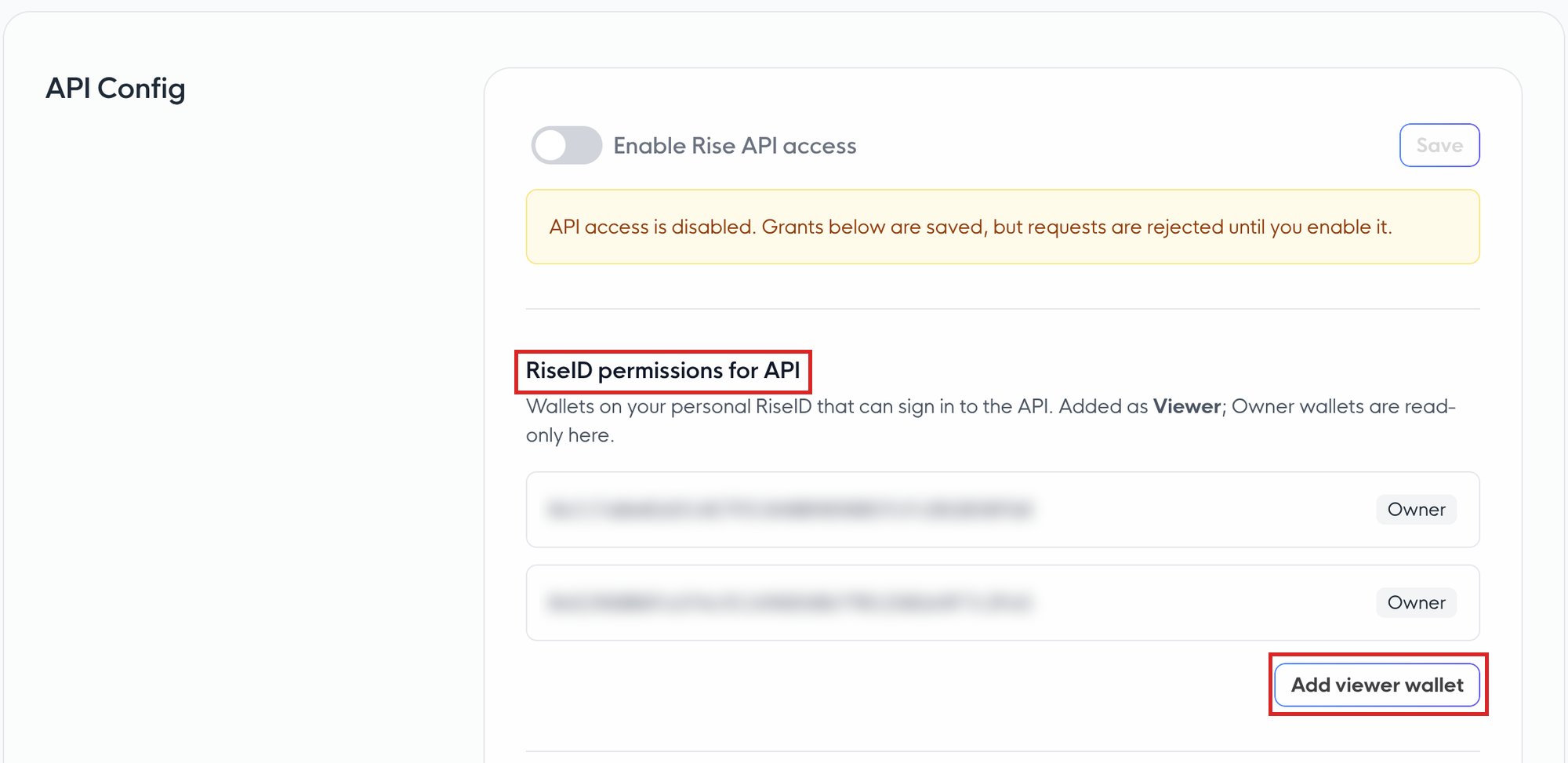
On the API Access page, under RiseID permissions for API, click Add API wallet.
1
Add the wallet
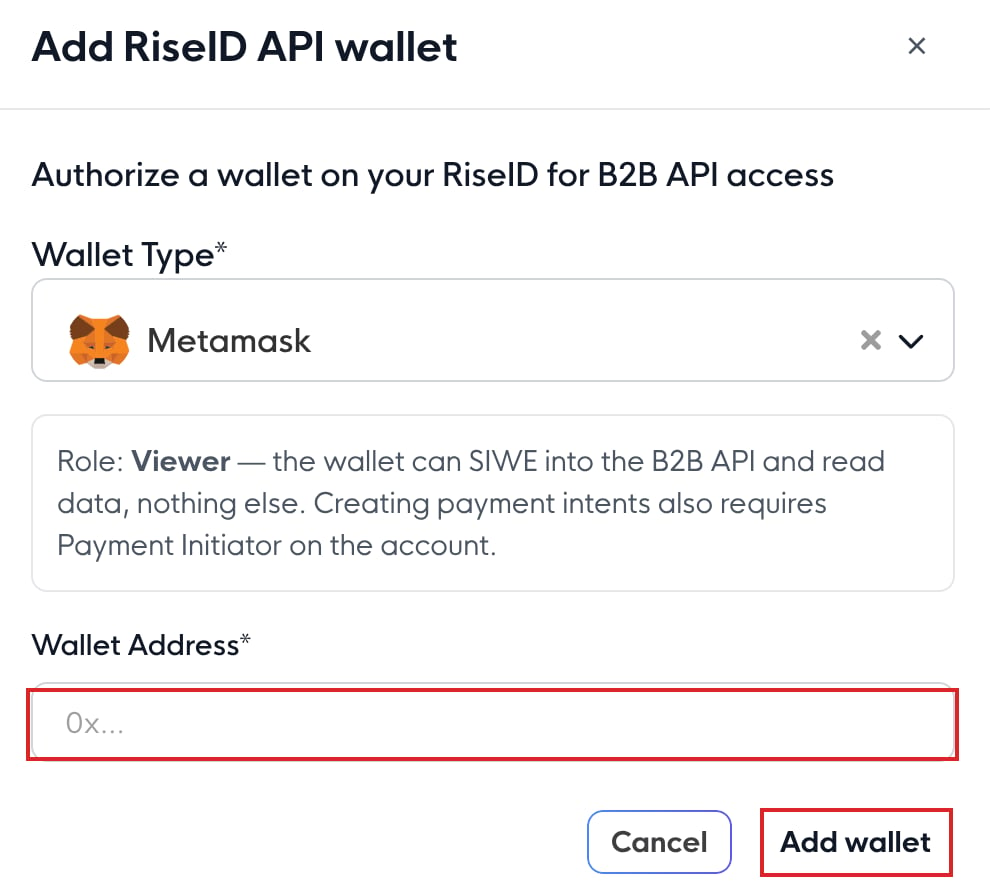
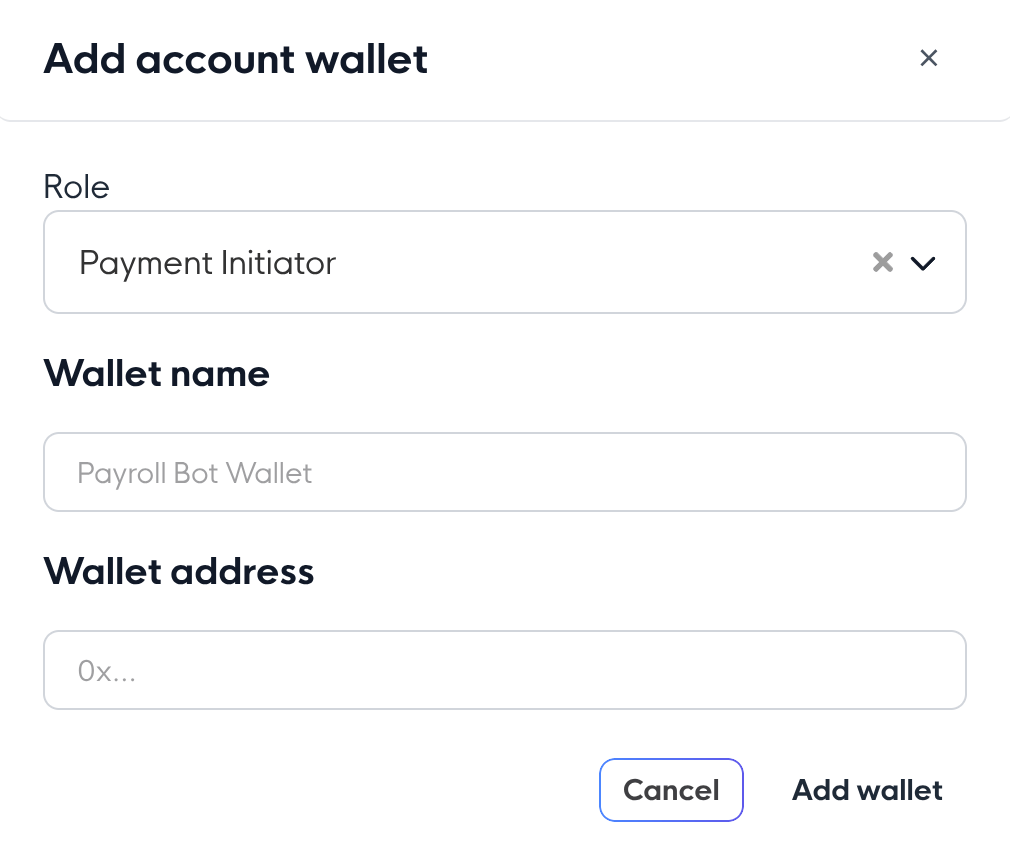
Under RiseID permissions for API, click Add API wallet. In the Add RiseID API wallet dialog, paste the wallet’s public address (never its private key) and click Add wallet. It’s added with the Viewer role. Don’t have a wallet yet? See Creating your first wallet.
2
Sign the change
Sign the prompt with a Rise security key or wallet that is already authorized on your RiseID. This records the new wallet’s role on-chain.
3
Wait for confirmation
Give the transaction a moment to confirm before you log in. Until it’s confirmed, the handshake still sees the wallet as unauthorized and returns a 403.
The Add RiseID API wallet dialog: the role is Viewer. Paste the address and click Add wallet.
This wallet signs you in and signs your payment intents, so guard its private key. Keep the key in a secret manager or HSM, never in code, a repo, a log, or anything client-side, because anyone who holds it can use the API as you until you remove the wallet on the API Access page. An Owner wallet from Security → Authorized Wallets has full control of your account and can move money, so sign in with one only for the calls that need it: paying immediately, instant payments and manager invites.
Use a dedicated wallet for API operations rather than one holding funds. It needs no balance, since Rise pays the gas. See Secondary Wallets.
The B2B API is off by default. You turn it on yourself in the app, no support request needed. This is a per-company setting, and staging and production are enabled separately.
1
Open API Access for the right company
Open the API Access page in the workspace of the company you want to enable. This setting is per-company and per-environment, so pick the right one.
2
Turn on Rise API access
Toggle Enable Rise API access.
3
Save and verify
Click Save. You’ll be prompted to confirm the change with your passkey and wallet. Once it goes through, the company is enabled for this environment.
Turn on Enable Rise API access, then click Save.
Staging and production are enabled independently. They run on separate databases, so enabling your company in staging does not enable it in production. Turn on each environment you plan to use. Most teams enable staging first to build against, then production before going live.
Until this is done, calls that resolve to your company return:
{ "success": false, "data": "Company is not enabled for B2B API access", "error_code": "B2B_ACCESS_DENIED"}
The login handshake authenticates a user, so the riseid you send is your personal (user) RiseID, not a company or team RiseID, and not your Rise Account address. Sending anything else returns 404 No entity found with riseid <id>.To find it in the app:
1
Open My Profile
Sign in to app.riseworks.io, open the user menu on the top bar (or the Account section of the left menu), and go to My Profile.
2
Copy the Rise ID
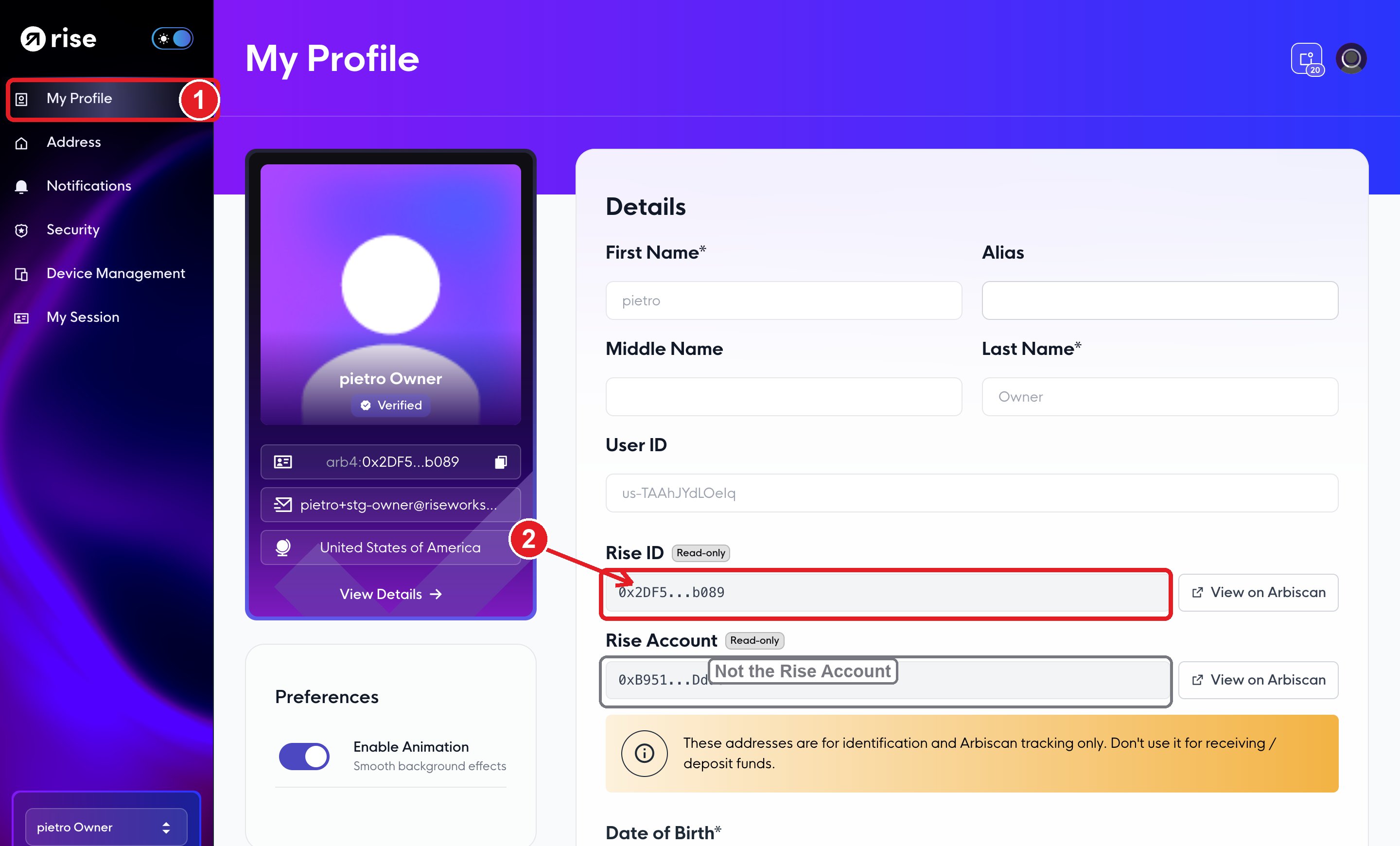
Under Details, copy the value in the Rise ID field. It’s a 42-character address that starts with 0x, for example 0x2DF5...b089.
Open My Profile from the left menu. 2. Under Details, copy the Rise ID (the bare 0x), not the Rise Account below it.
The same page shows a second address labelled Rise Account. That is not your RiseID and it won’t authenticate. Use the field labelled Rise ID. Mixing the two up is a common cause of the 404 above.
Send the bare 0x address, with no prefix. The Rise ID card in the sidebar shows the same value with a network prefix (arb4:0x…). Drop the arb4: (or eth: / arb1:) part, and the API matches on the plain 0x… shown in the Rise ID field. It is also not one of your us-, co-, or te- nanoids. A prefixed value or a nanoid is the single most common cause of 404 No entity found with riseid.
Company and team RiseIDs are used for API operations like payments and balances, addressed by their co- / te- nanoids rather than by the login handshake. See RiseID for how the identity hierarchy fits together.
This is the Viewer wallet you authorized under RiseID permissions for API in Authorize your API wallet. You pass its address as wallet and sign the SIWE challenge with its private key. To confirm which wallets can sign in, open the API Access page and check RiseID permissions for API.Once you have both values, run the authentication handshake. A successful GET /v2/me confirms the wallet is authorized and the token is valid; a scoped call like fetching a team or balance confirms your company is enabled for the environment.
To create payment intents, or whenever you work with a third-party provider, give your API wallet an account-level scoped credential with the Payment Initiator role instead of sharing a wallet that can move funds. A Payment Initiator can create payment intents, which then have to be approved before they’re processed, so the provider can queue payments without being able to move money on its own.
Your API session is the Viewer wallet you signed in with. Viewer on your RiseID only signs you in. What the session can do with an account depends on the role that same wallet holds on the account, and that wallet signs the payment intent. Signing an intent doesn’t execute a payment: an approver executes it in the app.
Role of your sign-in wallet on the account
Read (GET)
Create payment intents (pay_now: false)
Pay immediately (pay_now: true) and instant payments
None or Viewer
✅
❌ 403
❌ 403
Payment Initiator
✅
✅
❌ 403
Payer, Owner, or Treasurer
✅
✅
✅
Manager invites need an Owner wallet from Security → Authorized Wallets.Recommended: give the wallet Payment Initiator if your integration only creates intents. Give it Payer only if it has to pay without approval in the app, since Payer can move funds from the account.
The two prerequisites are checked at different points, which is why they fail differently:
The wallet-role check runs during the login handshake, so a wrong or unauthorized wallet fails at login. Company enablement is checked later, on the first request that names a company or team, so an un-enabled company can still log in and read /v2/me but gets a 403 the moment it touches a team or payment.
If you’re still blocked, match the response to the cause:
Response
Cause
Fix
404 No entity found with riseid <id>
The riseid has a network prefix (arb4:), is a us-/co-/te- nanoid, or is a company/team RiseID
Send the bare 0x from the Rise ID field on My Profile, prefix stripped
400 Wallet address is required / 400 riseid is required
GET /v2/auth/siwe was called without the wallet or riseid query param
Pass both: /v2/auth/siwe?wallet=<0x>&riseid=<0x>
403 Wallet <addr> is not an authorized member...
The signing wallet has no authorized role on the RiseID, or the grant hasn’t confirmed on-chain yet
Add the wallet under RiseID permissions for API (it’s added as Viewer), then wait for the transaction to confirm
403 Signer is not authorized on-chain for this operation on PUT /v2/invites/manager
Manager invites need an Owner wallet, and your session signed in with a Viewer wallet
Sign in with an Owner wallet from Security → Authorized Wallets for manager invites
403 Wallet <addr> needs one of ... on account <addr>
Your sign-in wallet has no Payment Initiator, Payer, Owner, or Treasurer role on the account you’re paying from, or it has only Viewer
Add the same wallet under Account permissions for API (Payment Initiator for intents, Payer to pay immediately), then wait for the transaction to confirm
403 Viewer API sessions must sign with the wallet used to sign in (or Owner API sessions …)
The payment or manager invite was signed by a different wallet than the one you signed in with
Sign the typed data with your sign-in wallet
403 Viewer wallet role can only make payments and payee invites...
A Viewer session called something other than a payment or a payee invite, such as a manager invite
Sign in with an Owner wallet for that call
403 Company is not enabled for B2B API access
Company not enabled for this environment
Enable it in the app, and check you’re pointed at the environment you enabled
401 Authentication required. Please provide Authorization...
The token is missing or malformed on a call that needs it
Send Authorization: Bearer <jwt> from the handshake (the SDK does this for you)
SIWE error: Signature does not match address...
A different wallet signed than the one in the message, or the message was altered before signing
Sign the exact data.siwe string with the same wallet you passed as wallet
If you’re not sure a wallet’s role saved, confirm it from the login handshake succeeding, or by checking the RiseID on Arbiscan.